
If the Change value on your overlay shows ????, the overlay is working
fine — it just has nothing to compare against yet.
Change is measured from the start of a session. Starting one records your RP at that moment, and everything after is counted against it. Until a session exists there's no starting point, so there's no change to show.
Start a session
Any one of these works — pick whichever suits how you stream.
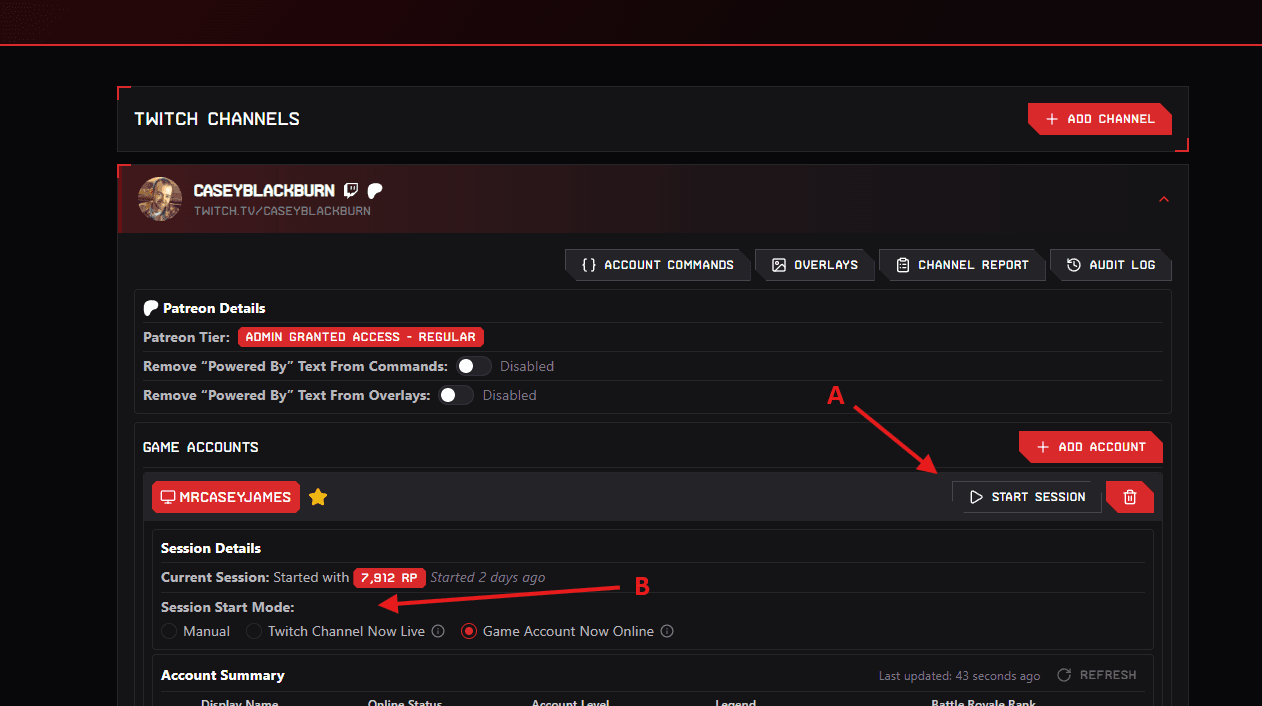
From the dashboard
Click Start Session next to the game account, then confirm.
From chat
Set up the Start Session command and run it in your chat when you sit down to play. You'll find it in Account Commands under Session Related.
Start sessions automatically
If you'd rather not remember, set a Session Start Mode for the game account (marked B in the screenshot above) so future sessions begin on their own.
| Mode | When a session starts |
|---|---|
| Manual | Never automatically — you start it yourself. |
| Twitch Channel Now Live | About a minute after your channel goes live with the game set to Apex Legends, if it's been offline for the past 30 minutes. |
| Game Account Now Online | About five minutes after your Apex account is logged in and in the lobby, if it's been offline for the past hour. |
Starting a fresh session
Starting a session again resets the starting point to right now. If your change numbers look far bigger than the session you just played, the session is probably an old one that's still running — start a new one and the overlay will count from there.
Still stuck?
If your overlay still shows ???? with a session running, ask in the
Discord server and include:
- your Twitch channel name
- which overlay you're using
- when you started the session
That's usually enough to work out what's happening without any back and forth.